

Liquid API
Tags
assign
Description
Used to assign a value to a variable.
Syntax
{% assign <variable_name> = <value> %}
Example
{% assign article = contents.news.first %}
{{ article.title }}
{{ article.body }}
block
Description
Blocks are regions of content that you may want to override in children pages. Their names are used to define the tabs in the backend and segment editable regions.
block are required for editable_* tags
editable_* tags (e.g. editable_text) must be contained within a block in order for them to work.

Syntax
{% block <name> %}{% endblock %}
Use only letters and underscores in your block name
Using dashes or other symbols will break functionality.
Examples
Click file tabs to see how nesting of blocks works.
<div class="container">
  {% block 'main' %}
    <div class="left">
      {% block 'sidebar', priority: 1, short_name: true %}
        Sidebar content
      {% endblock %}
    </div>
    <div class="right">
      {% block 'container', priority: 2, short_name: true %}
        Container content
      {% endblock %}
    </div>
  {% endblock %}
</div>
{% extends 'index' %}

{% block 'main/container' %}
    I just want to override the container block in page2, thanks.
{% endblock %}
Options
| Name | Type | Description |
|---|---|---|
| short_name | Boolean | In the back-office, use just the name and skip the name of the nested blocks.\ default: false |
| priority | Integer | allow blocks to be displayed before others. Higher the priority is, higher the position in the select box is.\ default: 0 |
capture
Description
Combine a number of strings into a single string and save it to a variable.
Syntax
{% capture <name> %}<text>{% endcapture %}
Example
{% capture full_name %}{{ person.first_name }} {{ person.last_name }}{% endcapture %}
{{ full_name }}
consume
Description
Read an external datasource (either JSON or XML), cache the content and allow you to iterate over the objects.
Syntax
{% consume <variable_name> from <url>(, <options>) %}
...
{% endconsume %}
Example
<p>
  {% consume api from "http://ip.jsontest.com/" %}
  My ip address is: {{ api.ip }}
  {% endconsume %}
</p>
{% consume blog from 'http://blog.locomotivecms.com/api/read/json?num=3&type=text', expires_in: 3000 %}
{% if blog == null %}
  the Tumblr API seems to be broken now.
  {% else %}
    {% for article in blog.posts %}
      {{ article.title }}
    {% endfor %}
  {% endif %}
{% endconsume %}
caching
For the caching, the LocomotiveCMS engine uses the default Rails caching.
If you want to use the Redis cache store, please read this blog article.
Options
| Name | Type | Description |
|---|---|---|
| expires_in | Integer | Delay in seconds during the content will be cached. 0 means no cache. |
| username | String | username if the external API requires an HTTP authentication. |
| password | String | password if the external API requires an HTTP authentication. |
csrf_meta
Description
The csrf_meta tag gives the information the javascript code has to include for each AJAX POST request in order to prevent Cross-Site Request Forgery (CSRF) attacks.
By default, that protection is disabled in order to keep backwards compatibility with the existing public forms.
If you want to enable it, open your config/initializers/locomotive.rb file and toggle the csrf property on.
config.csrf_protection = true
Syntax
{% csrf_meta %}
Example
<html>
  <head>
  {% csrf_meta %}
  </head>
  ...
</html>
csrf_param
Description
Forms inside the Liquid templates, such as a contact form for instance, can be protected from Cross-Site Request Forgery (CSRF) attacks.
By default, that protection is disabled in order to keep backwards compatibility with the existing public forms.
If you want to enable it, open your config/initializers/locomotive.rb file and toggle the csrf property on.
config.csrf_protection = true
For AJAX requests, please consider the csrf_meta tag.
Syntax
{% csrf_param %}
Example
<form action="/contact">
{% csrf_param %}
...
</form>
cycle
Description
Output the next option in a group on each call.
Syntax
{% cycle <group>: <value_1>, ..., <value_n> %}
Examples
{% cycle 'group 1': 'blue', 'green', 'red' %}
{% cycle 'group 1': 'blue', 'green', 'red' %}
{% cycle 'group 2': 'blue', 'green', 'red' %}
{% cycle 'group 1': 'blue', 'green', 'red' %}
blue
green
blue
red
editable_control
Description
Editable areas contain content you want a user to be able to change. The content within the tag will be the default one.
In the back-office, the editable element will be found under the tab corresponding to the block wrapping it. It is possible to associate the element to another block.
The input field in the back-office used to edit the content is a select field.
An element can be inherited by children, each page keeping its own version of the content. However, in some cases, it may be a requirement to have the element to be editable in one place. If so, just set the "fixed" option to true.
Syntax
{% editable_control <name>(, <options>) %}<default value>{% endeditable_control %}
Example
{% capture menu_enabled %}{% editable_control "menu", options: 'true=Yes,false=No', hint: "Tell if the menu is displayed or not", priority: 1 %}
  false
{% endeditable_control %}{% endcapture %}

{% if menu_enabled == 'true' %}
  DISPLAYED
{% endif %}
Options
| Name | Type | Description |
|---|---|---|
| options | String | options are separated by comma and value/label by a the "equals" sign. Ex: v1=l1,v2=l2,v3=l3,..etc. |
| block | String | associate the element with a block other than the current one. |
| fixed | Boolean | make the element editable in one place. The default value is false. |
| hint | String | text displayed in the back-office just below the select field. |
| priority | Integer | used to position the file field in the back-office. Elements with the highest priority are displayed first. |
editable_file
Description
Editable areas contain content you want a user to be able to change. The content within the tag will be the default one.
In the back-office, the editable element will be found under the tab corresponding to the block wrapping it. It is possible to associate the element to another block.
The input field in the back-office used to edit the content is a file field.
An element can be inherited by children, each page keeping its own version of the content. However, in some cases, it may be a requirement to have the element to be editable in one place. If so, just set the "fixed" option to true.
Syntax
{% editable_file <name>(, <options>) %}<default value>{% endeditable_file %}
Example
{% editable_file "banner", hint: "Upload a banner (perfect size: 300px by 100px)", priority: 1 %}
http://placehold.it/300x100
{% endeditable_file %}
Options
| Name | Type | Description |
|---|---|---|
| block | String | associate the element with a block other than the current one. |
| fixed | Boolean | make the element editable in one place. The default value is false. |
| hint | String | text displayed in the back-office just below the file field. |
| priority | Integer | used to position the file field in the back-office. Elements with the highest priority are displayed first. |
| resize | String | if the file is an image, apply a transformation. See the resize liquid filter for more examples, and more supported options (like JPEG compression). |
How to use editable image with a default value?
If you want to use a theme image as the default value of your editable file, you might be tempted to do this:
{% editable_file 'banner' %}{{ 'banner.png' | theme_image_url }}{% endeditable_file %}
Which won't work: editable tags can't include another Liquid tag.
So you need to pass the relative path of an image located in the public/samples directory of your Wagon site.
{% editable_file 'banner' %}/samples/banner.png{% endeditable_file %}
If you want to resize the image, the code should be as follows:
{% editable_file 'banner', resize: '2500x>' %}/samples/banner.png{% endeditable_file %}
editable_model
Description
The editable_model tags are used to display a short link to the content entries they reference in the live editing sidebar as described in this example:
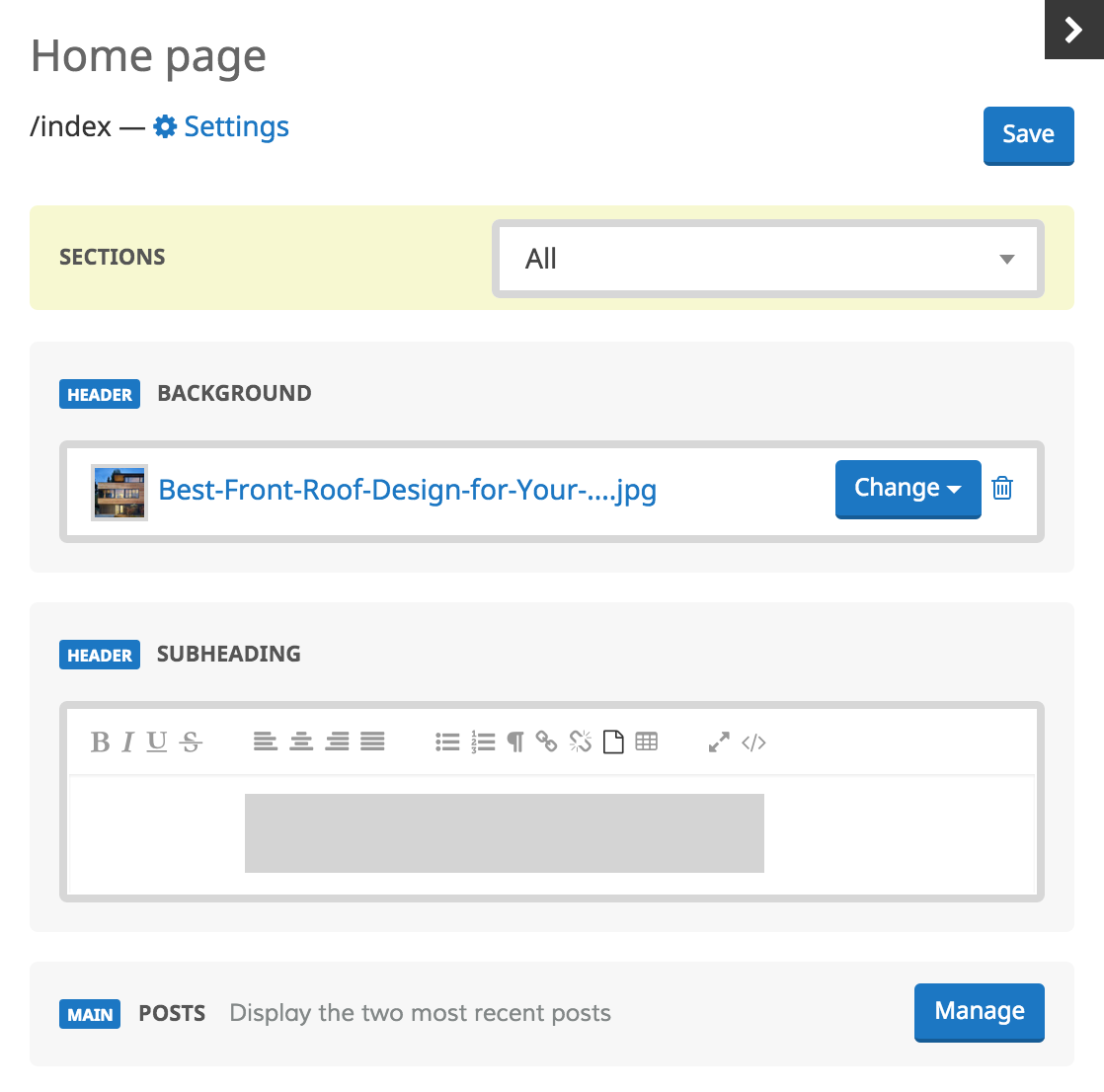
{% editable_model <model_name>(, <options>) %}
...
{% endeditable_model %}
Example
{% editable_model products, hint: 'some text' %}
  <ul>
  {% for product in contents.products %}
    <li><a href="{% path_to product %}">{{ product.name }}</a></li>
  {% endfor %}
  </ul>
{% endeditable_model %}
Options
| Name | Type | Description |
|---|---|---|
| block | String | associate the element with a block other than the current one. This determines what tab this tag's textarea appears under in the back-office. |
| hint | String | text displayed in the back-office right after the label of the content type. |
editable_text
Description
The editable_text tags are placeholders for content that you want users to be able to edit through the back-office. They replaced the now deprecated editable_short_text and editable_long_text tags.
Users can change the content of an editable_text tag by going to the pages section of the back office, selecting the page on which the tag appears, and then selecting the tab which corresponds to the name of the block wrapping the tag. Each editable_text tag is represented by a textarea labled with the editable_text's name. When no text has been entered into the back-office, the content within the tags is displayed by default.
If a block containing an editable_text tags is inherited by child pages, these child pages each store its own version of content and can be edited separately. For cases requring a single version of the content to be used on all pages and editable in only one location (such as text in the header or footer of a site), make use of the fixed option described below.
{% editable_text <name>(, <options>) %}<default value>{% endeditable_text %}
Example
{% editable_text "sample_title", hint: "Description of this area." %}
Default Content
{% endeditable_text %}
Options
| Name | Type | Description |
|---|---|---|
| slug | String | Slug of the editable text.\ By default, use the underscored version of the first param . |
| label | String | Label of the editable text as displayed in the back-office.\ By default, use a humanized version (no underscore, no hyphen, ...etc) of the first param. |
| block | String | associate the element with a block other than the current one. This determines what tab this tag's textarea appears under in the back-office. |
| fixed | Boolean | makes the element editable in one place. The default value is false. |
| format | String | accepted values are html, markdown and raw. If set to html, content is not escaped and will be rendered as html. If set to raw, any html content will be escaped and rendered as text. The default value is html. |
| hint | String | text displayed in the back-office just below the textarea. |
| line_break | Boolean | if true, the text is ouput inside tags, which are displayed as blocks in HTML and will consequently be separate line from surrounding elements. If false, the text is output inside tags, which are displayed inline (so the text will not break to a new line). The default value is true. |
| priority | Integer | used to position the textarea in the back-office. Elements with the highest priority are displayed first. |
| rows | Integer | determines the height of textarea in the back-office, measured in rows of text. The default value is 10. |
Using editable_text inside a html tag needs a work-around
Use {{ page.editable_elements.<your block path>.text }} inside your html tags and define the editable_text outside in a capture tag.
{% capture text %}
   {% editable_text "text", line_break: false, format: 'raw', rows: 1 %}
      Text
   {% endeditable_text %}
{% endcapture %}
<a href="{% path_to page %}" title="{{ page.editable_elements.<your block path>.text }}">
   {{ text }}
</a>
Using editable_text inside snippets
Although it may be tempting to use editable_text or any other editable elements within snippets, it is highly recommended to not doing it because it makes the content rendered by the engine not reliable. Make sure it is wrapped inside a block tag if you doing so.
extends
Description
The extends tag must ALWAYS be the first statement.
Set the layout of the current page. A page can be a layout for another page. The tag needs a single parameter which can take two values:
- parent the layout for the parent url
- some/page/path a specific pages layout
You do not need to close this tag.
Syntax
{% extends <fullpath_or_parent> %}
Examples
{% extends parent %}
{% extends 'support/index' %}
include
Description
Include sections of content you would like to repeat across the website. The optional with clause lets you specify a value which is bound to the snippet's name within the snippet's context.
The snippets are declared in the app/views/snippets directory, the snippet slug is the filename.
Syntax
{% include <name_of_the_snippet> %}
{% include <name_of_the_snippet> with <name_1>: <value_1>, ...<name_n>: <value_n> %}
{% include <name_of_the_snippet> with <object> %}
Examples
{% include 'footer' %}
{% include 'sidebar' with foo: 'bar' %}
{% include 'product_information' with product %}
link_to
Description
Return a html anchor to a given page or a content entry if the content entry owns a templatized page. The page is identified by its handle.
Syntax
{% link_to <object_or_page_handle> %}
{% link_to <object_or_page_handle> %}
<HTML>
{% endlink_to %}
Example
{% link_to some-page %}
{% link_to about-us %}
  <i class="icon-info-sign"></i> {{ target.title }}
{% endlink_to %}
<a href="/path/to/some-page">Some page title</a>
<a href="/path/to/about-us">
  <i class="icon-info-sign"></i> About us
</a>
locale_switcher
Description
Display the links to change the locale of the current page. The links are wrapped inside a DIV tag.
The link to the current locale owns the class current which makes it possible to customize through CSS.
Nothing will be displayed if you do not select at least 2 locales for your site.
Syntax
{% locale_switcher <options> %}
Example
{% locale_switcher label: 'locale', sep: ' - ' %}
Options
| Name | Type | Description |
|---|---|---|
| label | String | takes one of the following options: iso (de, fr, en, ...etc), locale (Deutsch, Français, English, ...etc), title (page title). By default, "iso". |
| sep | String | piece of html code separating 2 locales. By default, " \ |
model_form
Description
Display the form html tag with the appropriate hidden fields in order to create a content entry from a public site. It handles callbacks, csrf and target url out of the box.
Syntax
{% model_form <your model>, <options> %}<your html form>{% endmodel_form %}
Examples
{% model_form 'newsletter_addresses' %}
  <input type='text' name='content[email]' />
  <input type='submit' value='Add' />
{% endmodel_form %}
{% model_form 'newsletter_addresses', class: 'a-css-class', success: '/welcome', error: '/error' %}
  <input type='text' name='content[email]' />
  <input type='submit' value='Add' />
{% endform_form %}
nav
Description
Render a list of links pointing to your pages. You can specify a context from where the pages will be pulled out. The context takes the following values: site, parent or page.
Moreover, it is also possible to include the nested pages.
Your pages must fill 2 conditions to be part of the navigation: be published and be listed.
The order is based on the one you specify in your LocomotiveCMS back-office.
Syntax
{% nav <origin>(, <options>) %}
Examples
{% nav 'parent', depth: 1, no_wrapper: false, exclude: nil, icon: false %}
{% nav site, exclude: '\.*-bottom', depth: 2, snippet: menu_entry %}
{% block misc_properties %}
  {% editable_text menu_teaser %}{% endeditable_text %}
  {% editable_file menu_image %}{% endeditable_file %}
{% endblock %}
[With a snippet]
nav tag in the page
{{ page.menu_teaser }} {{ page.menu_image }}
snippet named "menu-entry"
Options
| Name | Type | Description |
|---|---|---|
| depth | Integer | how many levels of children to display. 1 by default. |
| snippet | String | name of the snippet which will be used to render a page entry. Optional. |
| no_wrapper | Boolean | do not output the nav and ul wrapper tags. false by default. |
| exclude | String | regexp string of slugs to be ignored. |
| icon | String | ouput a span to be used as an icon. |
| id | String | css unique identifier for the nav tag. "nav" by default. |
| class | String | class of the nav tag. |
| active_class | String | name of the css class when the current page is the one in the menu. |
| bootstrap | Boolean | use the twitter bootstrap classes. false by default |
paginate
Description
The paginate tag is responsible for pagination within the LocomotiveCMS engine. It is currently applicable to the entries of content types.
It can be combined with the with_scope tag.
Syntax
{% paginate contents.projects by 10 %}
<loop>
{% endpaginate %}
Example
{% paginate contents.projects by 10 %}
  {% for project in paginate.collection %}
    {{ project.title }}
  {% endfor %}
{% endpaginate %}
Properties of the paginate object
| Name | Type | Description |
|---|---|---|
| collection | Array | list of elements |
| current_page | Integer | the index of the current page |
| previous_page | Integer | the index of the previous page. Nil if there is no previous page |
| next_page | Integer | the index of the next page. Nil if there is no next page |
| total_entries | Integer | total number of entries |
| per_page | Integer | number of entries per page |
| total_pages | Integer | total number of pages |
| parts | Array | list of all the parts which make up a good navigation for this pagination. Each element will have any of these three elements: title (String), url (String), is_link (Boolean). |
| previous | String | url to the previous page. Nil if there is no previous page |
| next | String | url to the next page. Nil if there is no next page |
path_to
Description
Return the link to a given page or a content entry if the content entry owns a templatized page. The page is identified by its handle.
Syntax
{% path_to <object_or_page_handle>(, locale: [fr|de|...], with: <page_handle>) %}
Examples
The path to my about us page: {% path_to about-us %}
The path to my about us page: /corporate/about-us
The path to my about us page: {% path_to about-us, locale: fr %}
The path to my about us page: /fr/corporate/a-notre-sujet
The path to my product with a page (fullpath: /featured-products/*) used as a template {% path_to product, with: 'featured-product-template' %}
The path to my product with a page (fullpath: /featured-products/*) used as a template /featured-products/slug-of-my-product
seo
Description
Output the meta tags and associated content for keywords and description. Depending on the current page, the following fallback is applied:
- if the page is "templatized", check first for the keywords / description of the related content entry.
- if the keywords / description of the page are filled up, use them.
- finally, use those of the site if the previous objects failed to return non-blank keywords / description.
Alternatively, you can access the keywords and description directly from an object among those: site, page, content_entry.
{{ site.keywords }}
{{ site.description }}

{{ page.meta_keywords }}
{{ page.meta_description }}

{{ content_entry.meta_keywords }}
{{ content_entry.meta_description }}
Syntax
{% seo %}
Example
{% seo %}
session_assign
Description
Used to store in the session a key and its value.
Syntax
{% session_assign <key> = <value> %}
Examples
{% session_assign player_email = 'john@doe.net' %}
E-mail: {{ session.player_email }}
{% session_assign player_email = nil %}
with_scope
Description
The with_scope tag is used to filter a list of entries. The filter is applied directly to the MongoDB request which makes it very performant.
Syntax
{% with_scope <field_1>: <value_1>, ... <field_n>: <value_n> %}
<CODE>
{% endwith_scope %}
Examples
{% with_scope author: 'John Doe' %}
  {% for post in contents.posts %}
    {{ post.title }}
  {% endfor %}
{% endwith_scope %}
{% with_scope active: true %}
  {% paginate contents.projects by 10 %}
    {% for project in paginate.collection %}
      {{ project.title }}
    {% endfor %}
  {% endpaginate %}
{% endwith_scope %}
{% with_scope date.gt: today %}
  {% for event in contents.events %}
  ...
  {% endfor %}
{%endwith_scope %}
{% with_scope posted_at.gte: '2012/01/01', posted_at.lte: '2012/02/01' %}
  {% for post in contents.posts %}
    {{ post.title }}
  {% endfor %}
{% endwith_scope %}
{% with_scope price.lt: 42.0 %}
  {% for product in contents.products %}
    {{ product.name }}
  {% endfor %}
{% endwith_scope %}

{% with_scope price.lt: params.min_price %}
  {% for product in contents.products %}
    {{ product.name }}
  {% endfor %}
{% endwith_scope %}
{% with_scope started_at.lte: now, city: params.city, won: false, order_by: 'started_at.desc' %}
  {% assign prize = contents.prizes.first %}
{% endwith_scope %}
{% with_scope item: "fruit" %}
  {% for product in contents.products %}
    <li>
      {{product.name}}
    </li>
  {% endfor %}
{% endwith_scope%}
Pagination
If you need to paginate your results you'll need to wrap your pagination inside the with_scope tag.
{% with_scope item: "fruit" %}
  {% paginate contents.products by 10 %}
    {% for product in paginate.collection %}
      {{product.name}}
    {% endfor %}
  {% endpaginate %}
{% endwith_scope%}